One flow, from staff to payroll.
Profiles, attendance records and payroll calculations connect in People/HR.
01Staff records
02Attendance
03Payroll & payslips
All included in one People/HR selection.
Vasco People/HR · Attendance & payroll
Manage attendance, schedules, leave and payroll in one workflow. For teams in the office, across branches or in the field.
Your 7-day trial starts once your email is verified.

One module for the way your team works
PEOPLE/HR FEATURES
From a new employee to a payslip. Explore a feature to see how it works.
Keep profiles, organisation and team assignments in one place.
Clock in and out by phone. Review attendance from your dashboard.
One device for team attendance, with face scanning or a PIN.
Set working hours and assignments so everyone knows their shift.
Configure attendance locations and radii for offices, branches or field teams.
Manage requests and keep a clear record of time away.
Review extra hours and completed piecework before payroll.
Track advance balances and instalments so deductions are traceable.
Review calculations, finalise payment records and issue payslips.
SIMPLER EVERY DAY

BUILT AROUND YOUR TEAM
Start with what matters most. Vasco helps your admin get the workflow ready.
Profiles, attendance records and payroll calculations connect in People/HR.
All included in one People/HR selection.
Remote guidance helps your admin prepare starting data, attendance rules and pay components.
Set staff and admin access by responsibility. Payroll remains subject to review before finalising.
About data security →Manage office employees, shift workers and field staff with the right assignments and locations.
Add other Vasco modules when needed. During the trial, the owner can add them from Subscription after the first setup.
Explore modules →SEE VASCO AT WORK
See the product, then discuss how this workflow could fit your team.
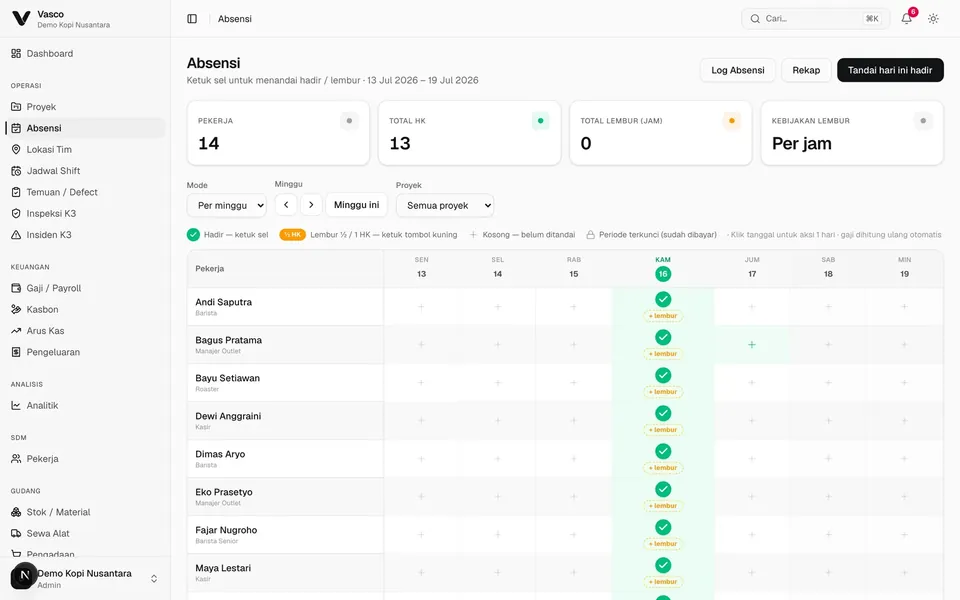 Actual product interface · demo data
Admins review attendance, overtime, piecework and advances before finalising payroll. Each figure has a record to trace.
HAVE A QUESTION?
Answers to common questions before you get started.
People/HR is Vasco's module for employee records, attendance, schedules, leave, overtime, piecework, advances and payroll. Reviewed records become the basis for payroll in one workflow.
Employees can clock in on their phones or a configured shared Terminal. Terminal supports face scanning and a backup PIN. Locations, radii, device permissions and attendance rules are configured during setup.
Yes. Configure staff, assignments, schedules and work locations for your team. Location tracking during a shift requires feature activation and device permissions.
Reviewed attendance is one of the calculation inputs, alongside rates, overtime, completed piecework and configured components. Admins review the result and advance deductions before finalising payment and issuing payslips.
Recording a payment in Vasco does not send money to a bank; salary transfers stay with your bank. PPh 21 and BPJS are calculated on the payslip once turned on in the pay rules, with downloadable summaries and withholding slips. Recruitment and formal KPI/OKR reviews are not included in the current People/HR offer.
No. You can start with People/HR alone and add other modules as needed and agreed. Overview, Admin and Settings are included.
Rp9.900 per employee per month, or Rp7.500 when paid annually, for at least 10 employees. Prices are final, with no VAT added; see the Pricing page for details. To try it, create an account: the free 7-day trial starts once your email is verified, without a credit card or automatic charges, and the team guides your admin through preparing the data.
Tell us what you need. Start with the workflow that helps most.
Guided setup · Free 7-day trial · No automatic charges